Osmind Psychiatrist Clinical Review
Last updated: October 8, 2026
Only for Osmind Care Network practices where the treating provider is not a psychiatrist, certain payers require that the patient's treatment plan for Spravato or TMS is confirmed in consultation with a psychiatrist. Osmind provides psychiatrist clinical review as part of your Osmind Care Network partnership so you don't need to find an external psychiatrist with whom to consult.
This article walks through the end-to-end process, including what your practice is responsible for and what Osmind handles on your behalf.
Who needs an Osmind psychiatrist clinical review?
Whether a psychiatrist review is required depends on your patient's specific payer. Osmind maintains a list of payers that explicitly require psychiatrist involvement versus those that are silent on the requirement. Based on the patient's insurance coverage, Osmind will route the request appropriately — either to our psychiatrist team for clinical review or directly to our RCM team for benefits verification.
You do not need to determine whether a psychiatrist review is required. Simply follow the steps below and our team will handle the routing.
The Big Picture Workflow
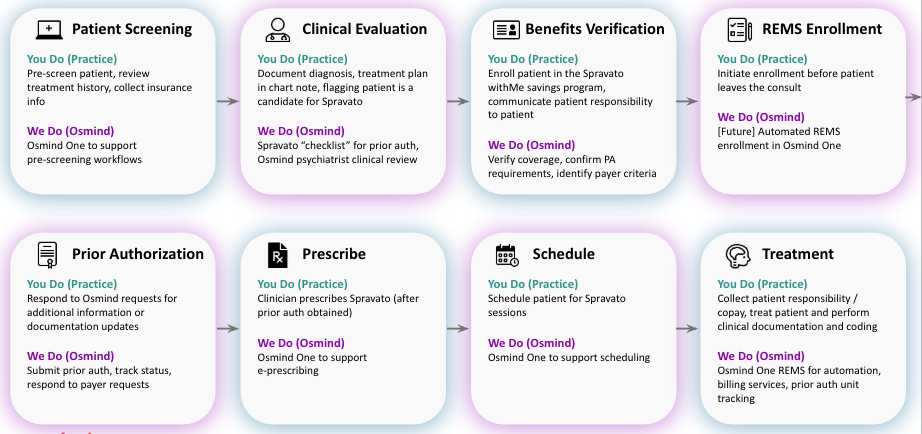
Step-by-Step Process
Step 1: Complete the Clinical Evaluation in Osmind One
After screening the patient and confirming they may be a candidate for Spravato, document your diagnosis and treatment plan in the Osmind One clinical note. When you toggle "Patient is a candidate for Spravato/TMS," the Spravato/TMS prior authorization checklist will appear. Complete this checklist thoroughly — comprehensive documentation at this stage is critical for obtaining prior authorization approval on the first submission.
Step 2: Submit a Support Request
Once your clinical documentation is complete, go to Support and create a ticket indicating that you have a patient who is a candidate for Spravato or TMS and you'd like Osmind to proceed with the next steps. Please include the patient's insurance/payer information in your request so we can route it correctly.
Note: In a future update, this step will be automated. Toggling "candidate for treatment" in the clinical note will automatically generate a request on your behalf.
Step 3: Osmind Psychiatrist Reviews and Co-Signs the Note (If Required)
If the patient's payer requires psychiatrist involvement, an Osmind psychiatrist will review the patient's chart and your clinical evaluation note. If everything looks good, they will co-sign the note. If the psychiatrist has questions or needs clarification on any documentation, they will communicate with you through the support ticket. Please respond promptly to any requests for additional information, as the prior authorization cannot be submitted until the co-signature is in place.
Step 4: Benefits Verification
Our RCM team verifies the patient's coverage and confirms whether a prior authorization is needed. This step may begin concurrently with the psychiatrist review to save time, but we will not submit the prior authorization until the psychiatrist co-signature is complete (when required by the payer).
Step 5: Prior Authorization Submission
If a prior authorization is required, our RCM team submits the co-signed clinical note along with all required payer documentation. From there, we track the status of the authorization and respond to any payer requests for additional information. If the payer does come back with questions or requests for updated documentation, we will reach out to you through the support ticket.
What You Do vs. What Osmind Does
Your practice is responsible for:
Pre-screening the patient and collecting insurance information
Documenting the diagnosis, treatment plan, and completing the Spravato or TMS checklist in Osmind One
Submitting a support request to kick off the process
Responding to any requests for clarification or additional documentation
Osmind handles:
Routing the request based on payer requirements
Psychiatrist clinical chart review and co-signature (when required)
Benefits verification and confirming PA requirements
Submitting and tracking the prior authorization
Communicating with the payer on your behalf
If you have questions about this process or need to submit a request, reach out to us through Support. We're here to make prior authorizations as seamless as possible for your practice.